


User Manual
Display Options
Arrr, here be where ye can set additional display options fer th' lyrics projection, matey! Available options be different dependin' on what mode ye be configurin', savvy?
Lyriken Projektion
Ahoy! If ye be viewin' a lyrics projection preview, ye will be able t' configure th' followin' settings, me hearty:
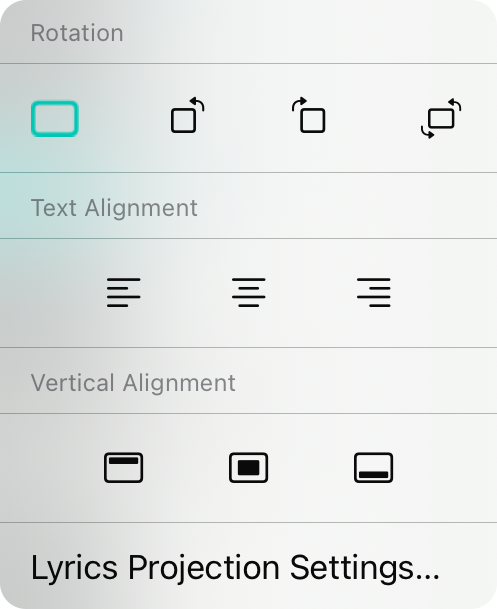
Rotation
Blimey, this be th' rotation o' th' display. Th' default be 0º which displays th' landscape orientation. Other options include rotate t' th' left (270º), rotate t' th' right (90º), or rotate upside down (180º).
Text Alignment
Arrr, here ye can change th' text alignment o' lyrics. Th' default be centered but ye can also choose left or right alignment, savvy?
Vertical Alignment
Here ye can choose where lyrics layout on th' lyrics display. Th' default be in th' middle but other options include top and bottom, matey.
Lyriken Projektion Settins
Ye can use this option t' open th' settins fer lyrics projection directly, ye scallywag.
Stage Monitor
Avast! If ye have configured stage monitor mode, this menu be displayed allowin' ye t' configure display options fer stage monitor mode, me hearty.
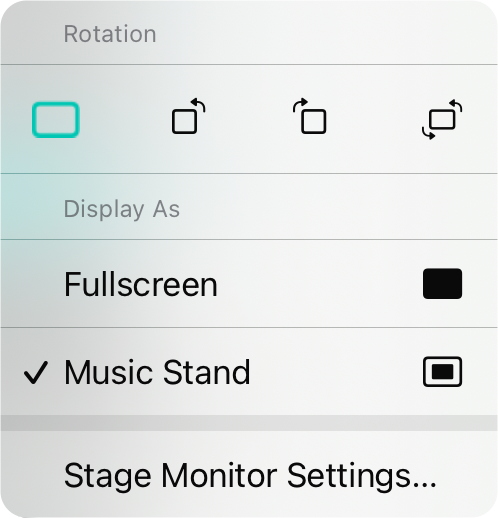
Rotation
Blimey, this be th' rotation o' th' display. Th' default be 0º which displays th' landscape orientation. Other options include rotate t' th' left (270º), rotate t' th' right (90º), or rotate upside down (180º).
Display As
This determines how stage monitor mode be presented, savvy?
- Fullscreen displays th' chord chart or sheet music edge-t'-edge without a border. This takes up th' entire screen, Arrr!
- Music Stand will show th' chord chart or sheet music as if on a music stand. This places some space around th' virtual page and will display two songs next t' each other when in landscape orientation, matey.
Stage Monitor Settins
Ye can use this option t' open th' settins fer stage monitor directly, ye scallywag.


